Ed's Race Weekend Dashboard

A pit wall for the family sofa

My son Ed and I watch every Formula 1 weekend together. I wanted one screen that followed our drivers, told us what was going on and settled the arguments. So we built one. It runs on a laptop, uses F1's own free live timing, and costs next to nothing to run.

Try it

The real dashboard, playing a made-up race

This isn't a video or a mock-up. It's the actual dashboard page, running in your browser against a race we invented, sped up fifteen times so the whole thing plays in about two minutes. Click around: switch to Ed's view, open the tyres and gaps, pick a layout, or try telly mode.

Works best on a laptop or a big screen. Open it full screen. The AI commentary, history lookups and predictions game need the real thing, because they go online.

What it does

Everything we wanted on one screen

Each of us picks the teams and drivers we follow and gets our own colour, so the screen lights up when one of ours does something. Ed follows Audi, I follow Ferrari, and we both follow Verstappen and Antonelli.

Live timing

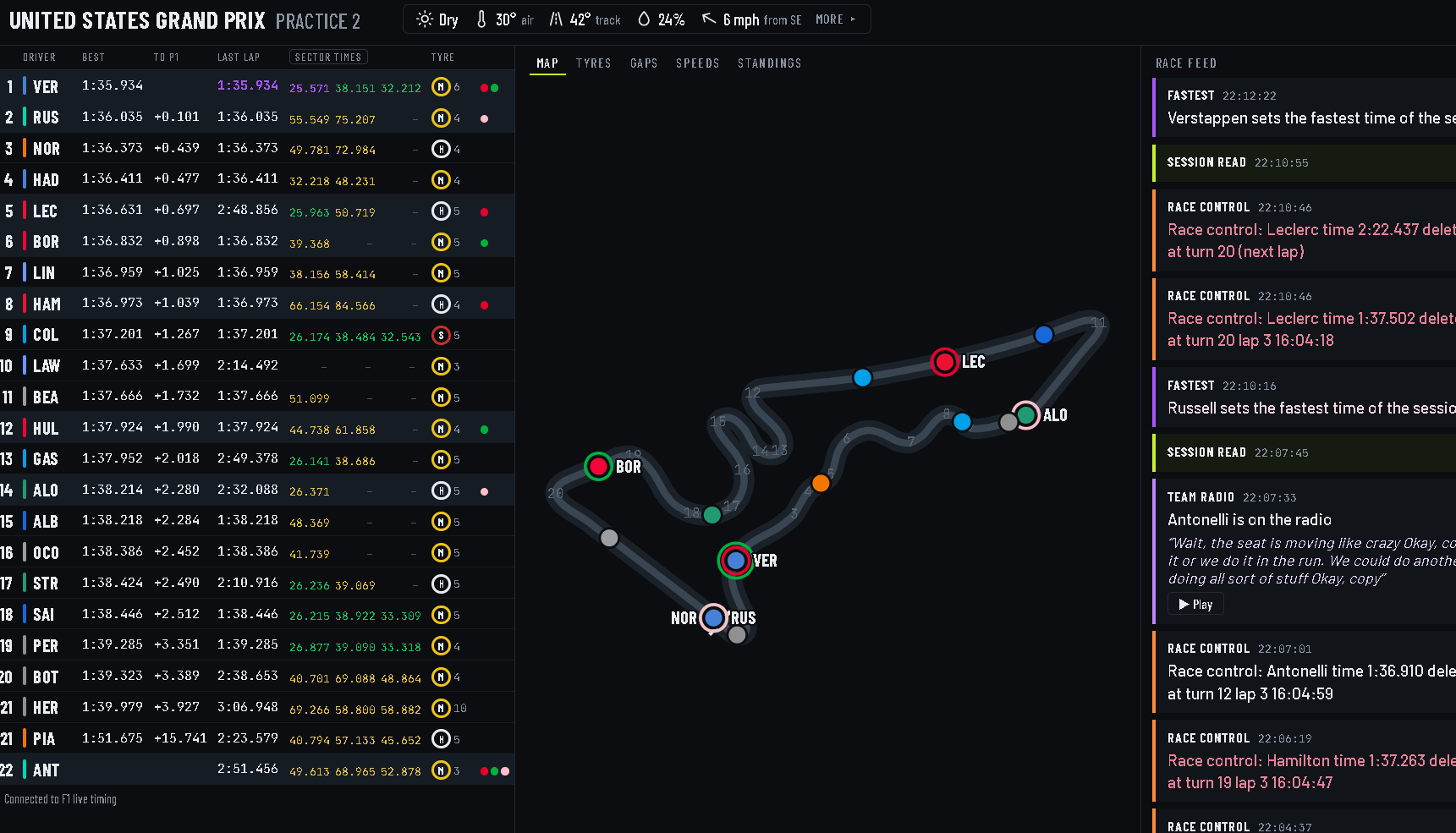
The full timing tower, with sector times in purple, green and yellow, the gaps, tyres and penalties, straight from F1's own feed.

Track map

Every car on the real circuit, with yellow flags lighting up the right stretch of track. Positions are worked out from the timing, as GPS is F1 TV only.

Team radio, written out

When one of our drivers is on the radio, the clip is written out word for word by a free speech model running on the laptop.

The stewards

Every incident followed from "noted" to the decision, and a badge by the driver's name when there's a penalty.

AI commentary

Every few laps the AI picks the most interesting story: who's catching who, tyres, the pit stops, rain on the way. The dashboard does the maths and the AI just writes the words.

History at a click

Click any driver, team or past race for the record: wins, poles, this season race by race, and how they've done at this track before.

The whole weekend

Between sessions it shows a countdown, the timetable in UK time, the last result and the weather for the next session.

For the family

Family outside the house can watch through a private link and a six-number code, and it sits on a phone's home screen like an app.

The dashboard during second practice at Austin, with the timing tower, the circuit map and the race feed
The real thing, during second practice at the 2026 United States Grand Prix in Austin.
The story

Built in a week, tested at Austin

I'm a business analyst by day, and over the last eighteen months I've been teaching myself to build things with AI. This started as a simple idea: put the free F1 timing on the laptop and highlight our drivers. Then Ed sat next to me every evening and kept asking "can it do this?". Some of the best ideas came from him.

I built it with Claude as my coding partner. I did the bit I'm good at, which is working out what the people using it actually need, and the AI did most of the typing. The first live test was Friday practice at Austin, which found two bugs on the first evening. By Saturday it had stewards' decisions, sector times, AI commentary and a logo.

The rule we kept to was that the dashboard does the sums and the AI only writes the words. It never guesses tyre wear or makes up strategy. If it's not in the timing, it doesn't say it.

Built in about a week.
Tested live at the 2026 United States Grand Prix.
Over forty automated tests, run by GitHub every time the code changes.And one very keen co-designer on the sofa.
The logo circuit
A little puzzle

Spot the four letters

The logo looks like a race circuit, and it is one. But there are four letters hidden in the track, one for each of us. The family know what they are. Can you find them?

A clueStart at the chequered line and follow the track. Think of the family round the sofa.
Get it

Run it on your own laptop

It's free and open source. You need a Windows laptop and about ten minutes. No F1 TV subscription and no paid services: the AI parts are optional and cost pennies a weekend, or nothing at all on Google's free tier.

Download it from GitHub and unzip it.

Double-click 1 Set up. It installs what it needs.

Open config.py in Notepad and put in your family's names, teams and drivers.

On race weekends, double-click 2 Start dashboard and enjoy the session.

Everything else, from sharing with family to the AI settings, is in the README, and How it works explains how it's put together.